
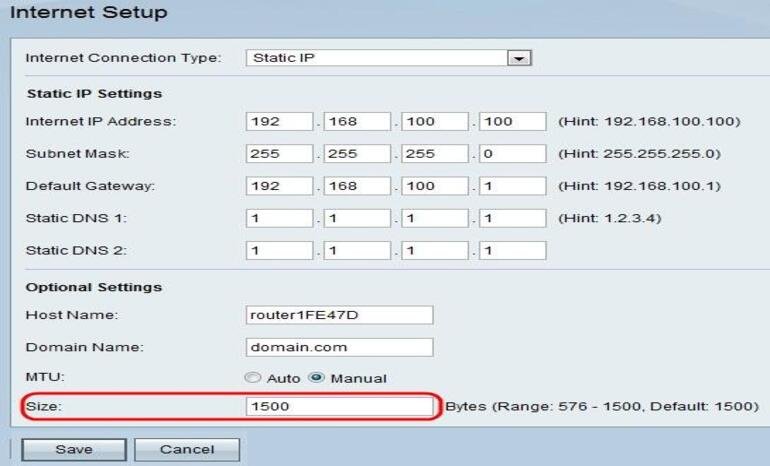
What Is a Static IP Address, and Why Do Businesses Need One?
In today’s digital business environment, reliable internet connectivity is essential for communication, cloud applications, remote working, customer management, and day-to-day operations. However, some businesses need more than a fast internet connection. They also need a consistent way for authorised users, devices, and online systems to identify and reach their network.
This is where a Static IP Address becomes useful.
A static IP address can help businesses configure remote access, connect office networks, operate certain servers, establish VPN connections, and manage network access more consistently. It is particularly valuable for organisations that depend on secure connections between their offices, employees, and business systems.
For companies using an Internet Leased Line (ILL), a static public IP address may be an important part of their network configuration, depending on their operational requirements.
At CorpFiber, we provide corporate Internet Leased Line connectivity for businesses in Siliguri, Darjeeling, and Jalpaiguri, West Bengal. In this guide, we explain what a static IP address is, how it differs from a dynamic IP address, and why businesses may need one.
What Is a Static IP Address?
A Static IP Address is an Internet Protocol address that remains assigned to a device or network interface rather than changing dynamically during normal operation.
An IP address helps identify a device or network endpoint so that internet traffic can be routed to the appropriate destination.
For example, a business may use a static public IP address to allow authorised remote users to connect to an office VPN or to make a particular service reachable through a consistent address.
The important point is that the address stays consistent according to the provider’s assignment and configuration. It does not mean that the connection itself can never go offline or that every device inside the office must use the same IP address.
Businesses should also distinguish between a static public IP address, which can be used for internet-facing connectivity, and a private IP address used within a local network.
What Is a Static Public IP Address?
A static public IP address is an internet-routable address assigned to a customer or network and kept consistent under the provider’s service arrangement.
It can be useful when external systems need to connect to a known address associated with a business.
For example, an organisation may configure a VPN gateway so that employees can connect to the office network from approved remote locations. A consistent public IP address can make that configuration easier to maintain.
Depending on the service, the provider may allocate one public IP address or a network block containing multiple addresses.
The number of addresses required depends on the network design. Not every business needs several public IP addresses, and a static IP alone does not automatically make a network secure.
Why Do Businesses Need a Static IP Address?
Not every organisation requires a static IP address. However, businesses using remote-access systems, VPNs, hosted services, or specific network security configurations may benefit from one.
Here are some common business uses.
1. Secure Remote Access to Office Systems
Many organisations need employees or technical staff to access approved office systems while working from another location.
A static public IP address can provide a consistent endpoint for remote-access services, depending on the network configuration.
For example, a company may use a VPN gateway to allow authorised employees to access internal applications, shared files, or other business resources.
Remote access should always be protected with appropriate authentication, access controls, encryption, and security updates. A static IP address by itself does not prevent unauthorised access.
2. Business VPN Connections
A Virtual Private Network (VPN) creates an encrypted connection between devices or networks over an underlying network.
Businesses use VPNs to connect remote employees, branches, and office systems. Some VPN configurations use static public IP addresses to identify the endpoint that authorised users or remote offices should contact.
For example, a company with an office in Siliguri and another location elsewhere may configure a site-to-site VPN between the two networks.
A static IP can make the endpoint configuration more predictable, although the precise requirements depend on the VPN technology and provider.
3. Hosting Business Applications or Servers
Some organisations host applications, services, or infrastructure that must be reachable from outside the office.
A static public IP address can help external systems connect to a known endpoint. Examples may include certain web services, remote-access gateways, or application systems.
However, hosting services requires more than an IP address. Businesses must consider firewall rules, domain names, software updates, port configuration, bandwidth, monitoring, and security.
A public-facing server should be configured carefully to reduce exposure to unwanted traffic and unauthorised access.
4. CCTV and Remote Monitoring
Businesses may need authorised staff to access CCTV systems, monitoring equipment, or other network-connected devices remotely.
A static IP address can support certain remote-access configurations where the system needs a consistent public endpoint.
However, direct exposure of CCTV recorders or cameras to the public internet can create security risks. A properly secured VPN or another protected remote-access solution is generally preferable to exposing management interfaces directly.
The best setup depends on the equipment, network design, and security requirements.
5. Firewall and IP-Based Access Rules
Some business systems allow access only from approved IP addresses.
For example, a company may configure a cloud platform, remote service, or firewall rule to accept connections from its office’s public IP address.
If the public IP address changes, administrators may need to update the relevant allowlist or access configuration. A static IP can reduce this administrative work.
However, IP allowlisting should be treated as one security measure rather than a complete security solution. Strong authentication and other appropriate controls remain important.
6. Connecting Multiple Office Locations
Organisations operating from multiple branches may need consistent network endpoints for communication between offices.
Static public IP addresses can support certain site-to-site VPNs, routing arrangements, and other network configurations.
For example, a head office may connect to a branch office through a VPN so authorised users can access shared applications or internal resources.
The number of IP addresses and the required routing depend on the design. A network professional can determine whether a single static IP, multiple addresses, or another approach is appropriate.
7. Managing Business IT Infrastructure
IT administrators often manage firewalls, routers, VPN gateways, monitoring tools, and other infrastructure.
A static IP address can simplify certain administrative tasks by providing a predictable public endpoint for approved systems and services.
This can be useful for organisations that maintain their own IT infrastructure or work with an external IT management provider.
The exact benefit depends on the network configuration and which systems need consistent external identification.
8. Supporting Call Centre and BPO Operations
Call centres and Business Process Outsourcing (BPO) companies may use cloud diallers, CRM platforms, VoIP systems, VPNs, and remote administration tools.
Some of these systems may require or benefit from a consistent public IP address for access rules, VPN configuration, or service integration.
A static IP can therefore be useful as part of the network setup, depending on the platform’s requirements.
It does not independently improve call quality or guarantee uninterrupted service. Voice performance also depends on bandwidth, latency, jitter, packet loss, local network configuration, and the underlying service.
Static IP vs Dynamic IP: What Is the Difference?
The main difference is whether the assigned IP address is intended to remain consistent or can change dynamically.
| Feature | Static IP Address | Dynamic IP Address |
|---|---|---|
| Address assignment | Intended to remain consistent | May change over time |
| Remote-access configuration | Can provide a predictable endpoint | May require dynamic DNS or another approach |
| VPN setup | Useful for certain fixed-endpoint configurations | Also possible, depending on VPN design |
| IP allowlisting | Easier when the approved address remains fixed | Changes may require configuration updates |
| Hosting services | Can simplify fixed-address access | Possible, but may need additional configuration |
| Suitability | Some business and specialised network requirements | General internet access and many everyday uses |
A dynamic IP address is sufficient for many businesses. Email, browsing, cloud applications, and numerous online services do not normally require the office to have a static public IP address.
The right choice depends on the applications and network services your organisation uses.
Does an Internet Leased Line Include a Static IP Address?
An Internet Leased Line is designed for business connectivity, often with dedicated bandwidth and service terms tailored to organisational requirements.
Static public IP addresses are commonly offered with business internet services, including some ILL plans. However, you should not assume that a particular number of static IP addresses is included in every plan.
The allocation depends on the provider, service package, and network configuration.
Before ordering an ILL connection, ask the provider:
- Is a static public IP address included?
- How many usable public IP addresses are available?
- Is the address assigned directly to the customer, or is the service behind carrier-grade NAT?
- Are additional IP addresses available if required?
- Is routing or a larger IP address block necessary for the planned setup?
- Are there additional charges for IP allocation or related configuration?
These questions help ensure that the selected service supports your actual business requirements.
What Is a /30 IP Address Block?
A /30 is an IPv4 subnet containing four total IP addresses.
In a traditional IPv4 /30 subnet, two addresses are generally usable as host addresses, while the remaining two are the network and broadcast addresses.
A provider may use a /30 subnet for a point-to-point connection or another specific network arrangement. The exact design depends on how the service is delivered.
Businesses should not assume that a /30 automatically provides four usable public IP addresses. The subnet size, routing configuration, and addresses available for customer use must be confirmed with the provider.
If your organisation requires multiple public IP addresses, ask the network provider to recommend the appropriate allocation for your intended use.
Does a Static IP Address Improve Internet Speed?
No. A static IP address does not inherently increase internet speed.
Speed and capacity depend on factors such as the subscribed bandwidth, network congestion, routing, equipment, Wi-Fi conditions, and the performance of the applications being used.
The value of a static IP address lies primarily in network configuration and accessibility, not in increasing Mbps.
For example, a business with a static IP and a 100 Mbps connection does not automatically receive faster internet than a business with a dynamic IP and the same bandwidth.
If your organisation needs greater capacity or more consistent business connectivity, consider the complete internet service, network design, and applicable service terms rather than treating a static IP as a speed upgrade.
Is a Static IP Address More Secure?
A static IP address is not inherently more secure than a dynamic IP address.
A fixed public address can make certain security rules easier to manage, such as allowing connections from approved office addresses. However, the same consistency can also make an internet-facing endpoint easier to identify over time.
Security depends on the protections surrounding the network.
Businesses should consider:
- Configuring a firewall with appropriate rules
- Using strong authentication and multi-factor authentication where supported
- Keeping routers, firewalls, servers, and applications updated
- Restricting remote access to authorised users
- Using encrypted VPN connections where appropriate
- Disabling unnecessary public-facing services
- Monitoring and reviewing access logs
A static IP address should be viewed as a network configuration option, not a substitute for cybersecurity measures.
How Many Static IP Addresses Does Your Business Need?
The number of static IP addresses required depends on your business applications and network architecture.
One static IP address
One address may be sufficient for a small business that needs a fixed VPN endpoint, an IP allowlist entry, or a specific remote-access configuration.
Multiple static IP addresses
A business may need additional addresses for particular servers, separate network services, or other approved configurations. The exact number depends on the architecture and whether services can share an address through appropriate routing and port configuration.
A subnet for specialised requirements
Larger organisations or businesses with more complex routing requirements may need a routed subnet or another allocation arrangement.
Do not order additional IP addresses without understanding how they will be used. A network administrator or service provider can help determine the appropriate allocation.
How Can You Get a Static IP Address for Your Business?
If your business needs a static public IP address, start by identifying why it is required.
Step 1: Identify your use case. Determine whether you need a VPN, remote access, IP allowlisting, a hosted service, branch connectivity, or another configuration.
Step 2: Check your current service. Ask your provider whether your existing connection includes a static public IP address and whether it is directly reachable from the internet.
Step 3: Confirm technical requirements. Check the number of addresses, routing, firewall configuration, and any compatibility requirements for your applications.
Step 4: Compare service terms. Review any additional charges and confirm whether the address or subnet is included in the selected plan.
Step 5: Configure security. Ensure that the IP address is used with appropriate access controls, firewall rules, and authentication.
Step 6: Test the setup. Verify that authorised systems can connect as intended and that unwanted access is restricted.
This process helps ensure that your static IP address supports a genuine business need.
Static IP Address and Corporate Internet Leased Line Services by CorpFiber
CorpFiber provides corporate Internet Leased Line connectivity for businesses in Siliguri, Darjeeling, and Jalpaiguri, West Bengal.
For organisations that require a consistent public IP address for VPNs, remote access, firewall rules, or other network configurations, static IP requirements can be discussed as part of the connectivity assessment.
The appropriate setup depends on your intended applications, required bandwidth, IP allocation, and technical feasibility at your premises.
Our aim is to help businesses identify a suitable corporate connectivity option at a reasonable price based on their requirements.
Whether you operate an office, call centre, educational institution, factory, hospital, or another organisation, discuss your network requirements before choosing the service configuration.
Contact CorpFiber to check ILL availability at your business location and discuss whether a static IP address is required for your setup.
Frequently Asked Questions About Static IP Addresses
1. What is a static IP address in simple terms?
A static IP address is an IP address assigned to a device or network endpoint that is intended to remain the same rather than changing dynamically during normal operation.
2. Why do businesses need a static IP address?
Businesses may use static IP addresses for VPNs, remote access, IP allowlisting, certain hosted services, branch connectivity, and network administration. Not every business requires one.
3. Is a static IP address necessary for an Internet Leased Line?
Not always. Some businesses require a static public IP address for specific applications, while others can use an ILL connection without one. Confirm the requirements of your systems and the provider’s service terms.
4. Does a static IP address increase internet speed?
No. A static IP address does not inherently increase bandwidth or speed. Its main benefit is providing a consistent address for certain network configurations.
5. Is a static IP address safer than a dynamic IP address?
Not automatically. Security depends on firewall configuration, authentication, software updates, network design, and other protective measures.
6. Can I access my office network remotely with a static IP address?
A static IP address can provide a consistent endpoint for certain remote-access systems. You still need compatible equipment, correct configuration, and appropriate security controls.
7. What is the difference between a static public IP and a private IP?
A public IP address is used for internet-routable communication, while a private IP address is used within private networks and is not directly routed across the public internet. A business can use both in its network.
8. How many static IP addresses does a business need?
It depends on the business’s applications and network architecture. Some businesses need one address, while others require multiple addresses or a subnet.
9. What does /30 mean in an IP address?
A /30 IPv4 subnet contains four total addresses, typically with two usable host addresses in a traditional subnet. The usable allocation for a customer depends on the provider’s routing and service design.
10. Can I get a static IP address with CorpFiber?
Contact CorpFiber to discuss your Internet Leased Line requirements in Siliguri, Darjeeling, or Jalpaiguri. The availability and allocation of static public IP addresses should be confirmed for your specific service configuration.
Get the Right Corporate Connectivity for Your Business
A static IP address can make certain business network configurations easier to maintain, particularly when your organisation needs consistent remote access, VPN connectivity, IP allowlisting, or hosted services.
However, not every business needs one, and a static IP does not automatically improve speed, security, or uptime. The best solution depends on how your organisation uses the internet and which systems need a consistent network endpoint.
Looking for a corporate Internet Leased Line in Siliguri, Darjeeling, or Jalpaiguri?
Contact CorpFiber to discuss your bandwidth, static IP, and connectivity requirements and request a customised quotation.
CorpFiber — Excellence in Every Connection.

Rosalina D. Willaim
Blogger/Photographerhe whimsically named Egg Canvas is the design director and photographer in New York. Why the nam

July 19, 2025